얼마전 릴스와 쇼츠에서 봤던 3D 도시 미니어처를 보고 신기해하던 차에 우연히 아래의 프롬프트를 발견했다.
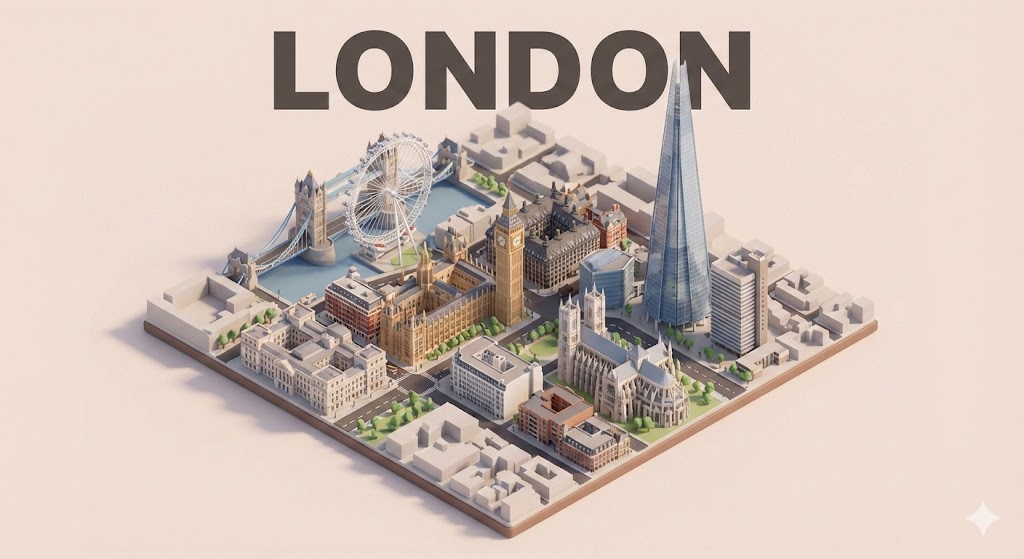
[CITY] 부분에 도시이름만 넣으면 해당 지역의 랜드마크를 웹검색을 통해 사진, 3D 이미지 등을 검색해서 반영하는것 같다. Gemini Nano banana 에서 일단 아주 잘 동작한다.
Present a clear, 45° top-down isometric miniature 3D cartoon scene of [CITY], featuring its most iconic landmarks and architectural elements. Use soft, refined textures with realistic PBR materials and gentle, lifelike lighting and shadows. Integrate the good weather conditions directly into the city environment to create an immersive atmospheric mood.
Use a clean, minimalistic composition with a soft, solid-colored background.
At the top-center, place the title “[CITY]” in large bold text.
All text must be centered with consistent spacing, and may subtly overlap the tops of the buildings.Square 1080x1080 dimension.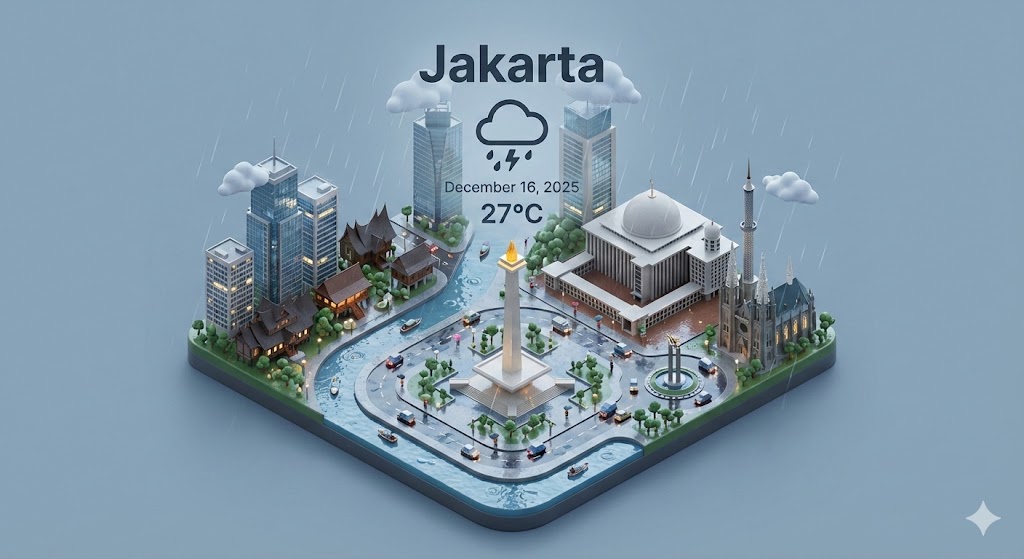
Present a clear, 45° top-down isometric miniature 3D cartoon scene of [CITY], featuring its most iconic landmarks and architectural elements. Use soft, refined textures with realistic PBR materials and gentle, lifelike lighting and shadows. Integrate the current weather conditions directly into the city environment to create an immersive atmospheric mood.
Use a clean, minimalistic composition with a soft, solid-colored background.
At the top-center, place the title “[CITY]” in large bold text, a prominent weather icon beneath it, then the date (small text) and temperature (medium text).
All text must be centered with consistent spacing, and may subtly overlap the tops of the buildings.
Square 1080x1080 dimension.
다음달 출장이 계획되어있는 자카르타도 만들어봤다.
자카르타 미니어처를 생성한 프롬프트는 현재 날씨를 적용하도록 되어있다.
아래처럼 날씨를 표현하는 부분에서 차이가 있다.
[LONDON]
Integrate the good weather conditions directly into the city environment to create an immersive atmospheric mood.
Use a clean, minimalistic composition with a soft, solid-colored background.
At the top-center, place the title “[CITY]” in large bold text.

[JAKARTA]
Integrate the current weather conditions directly into the city environment to create an immersive atmospheric mood.
Use a clean, minimalistic composition with a soft, solid-colored background.
At the top-center, place the title “[CITY]” in large bold text, a prominent weather icon beneath it, then the date (small text) and temperature (medium text).
이와같은 평문 프롬프트는 복사하고 붙여넣기가 간단하지만 이미지를 형성하는 구조를 알아보기 쉽지않다.
해당 프롬프트를 chatgpt(Gemini 에서도 가능)에서 JSON 형식으로 바꿔봤다.
{
  "city": "[CITY_NAME]",

  "scene_style": "45° top-down isometric miniature 3D cartoon environment",

  "visual_structure": {
    "scale": "Miniature city layout",
    "architecture": "Detailed iconic landmarks and buildings representative to the city",
    "materials": "Soft and refined surface style with realistic PBR mapping",
    "lighting": "Natural, gentle and lifelike illumination with soft shadows",
    "shading": "Subtle depth shading for realism enhancement"
  },

  "weather": {
    "integration": "Embed real-time weather conditions into lighting, reflections, surface wetness, sky tone, and atmosphere",

    "layout": {
      "icon_position": "Top-center below title",
      "date_position": "Below weather icon",
      "temperature_position": "Below date"
    },

    "text_format": {
      "temperature_size": "Medium",
      "date_size": "Small",
      "alignment": "Centered",
      "spacing": "Even vertical spacing between weather elements"
    }
  },

  "composition": {
    "camera": "Isometric angled perspective at 45° top-down",
    "focus": "City center/iconic structures",
    "background": "Soft single color minimalistic backdrop",
    "visual_balance": "Simplified outer scene area, avoiding clutter",
    "lighting_balance": "Bright center focus with softened edge shadows"
  },

  "text_overlay": {
    "title": {
      "content_source": "Use city key value",
      "position": "Top-center",
      "size": "Large bold",
      "alignment": "Centered",
      "overlap_behavior": "Allow subtle title overlap with top building edges"
    }
  }
}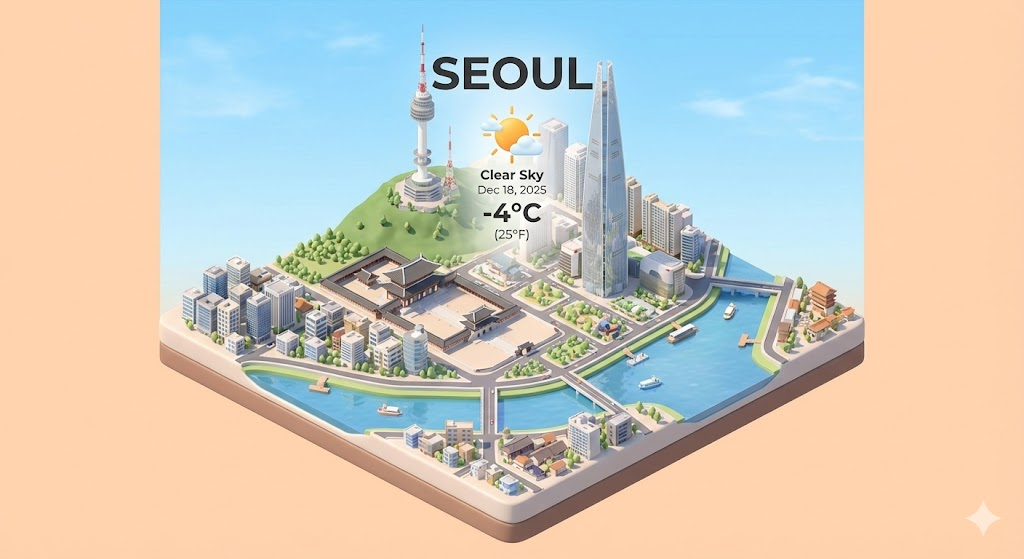
JSON 프롬프트로 만든 서울(Seoul) 미니어처.
경복궁, 남산타워, 롯데타워, 한강 등 서울의 랜드마크가 잘 표현된다.
최근 핫했던 영남일보 기사를 보면 각 지역의 특산물도 표현되는것 같다.
https://www.yeongnam.com/web/view.php?key=20251206029212698
VEO 3 사용이 가능하다면 ‘카메라 이동없이 요소들만 움직이도록’ 프롬프트를 작성해서 아래같은 영상을 만들 수 있다.
알아서 음악과 자동차 소리, 물 소리 등 효과음도 자동으로 추가해줬다.
오밀조밀 움직이는게 너무 귀엽다.